Irrigation field documentation software

Irrigation Mapping & Inspection Software

FieldMapr helps irrigation professionals map sprinkler systems on satellite imagery, create inspection reports, schedule follow-up jobs, and use an AI assistant built specifically for irrigation workflows.

Free to start. Paid plans include a 14-day trial. No credit card required to sign up.

FieldMapr map editor showing irrigation markers, Edit map control, and layers on satellite imagery
  • Built for irrigation crews

    Contractors, solo ops, and small companies

  • Free to start

    No credit card required to sign up

  • Maps that travel with the truck

    Hand systems to new techs without a walkthrough

  • Reports the same day

    Branded PDFs from the inspection you just finished

Know every system you service

Heads, valves, wire runs, and zones live on the map — not in one tech's notebook or memory.

Inspections tied to the property

Document what you find in the field digitally, linked to the customer and service site it belongs to.

Schedule the work that follows

Turn findings into dispatched jobs with a shared calendar and board — so the office and trucks stay aligned.

Irrigation report software built for the field

Mapping, inspections, jobs, documentation, and reports in one place — so your crew spends less time reconstructing systems from memory.

Irrigation inspection reports

Run spring startups, backflow checks, and seasonal inspections with checklists tied to each property. Build customer-ready reports from your field findings.

Live satellite mapping

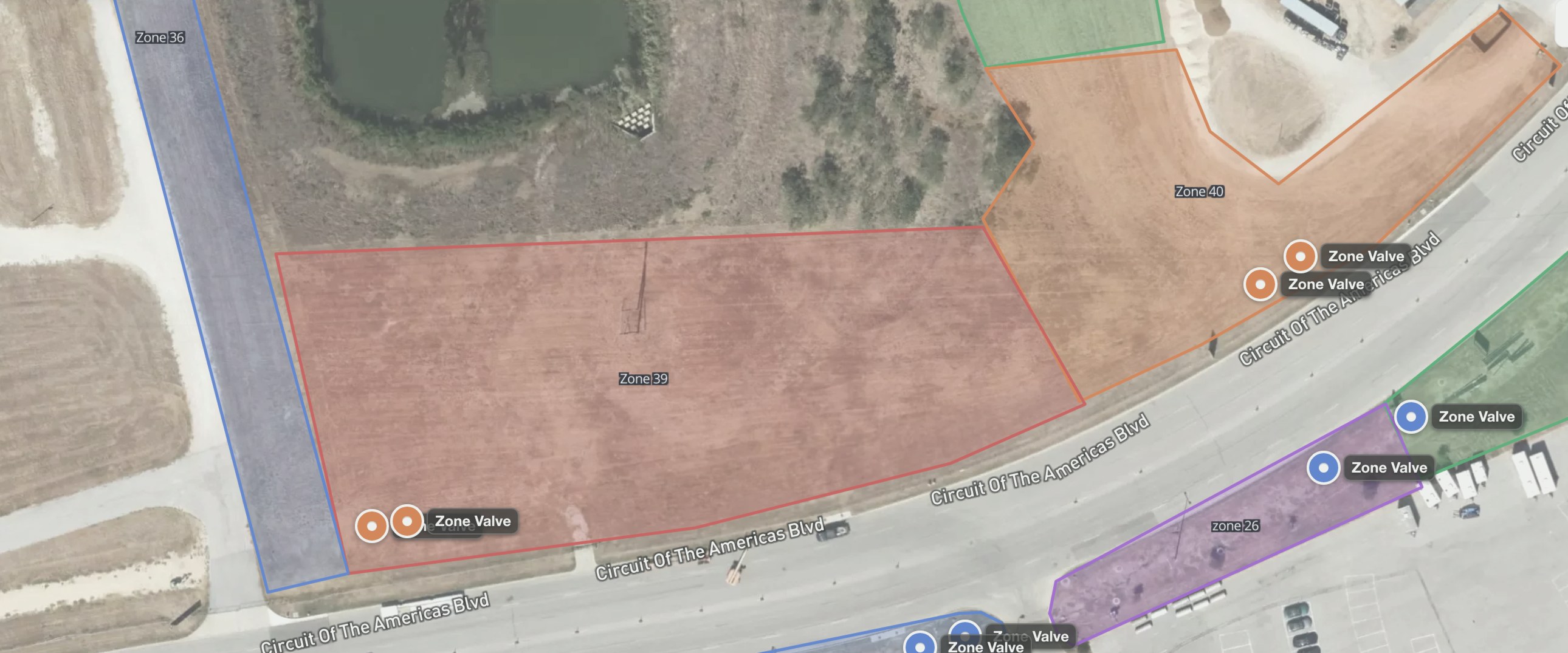
Map sprinkler systems on high-resolution satellite imagery. Place heads, pipe, wire, valves, and zones where they actually are on the property.

Jobs & dispatch (Beta)

Schedule work orders, assign technicians, and manage the unscheduled queue from one board — connected to customers and properties.

Mobile-friendly field use

Designed for technicians on phones and tablets in the yard. Pull up properties, map systems, and complete inspections without heading back to the office.

PDF & report output

Export maps and inspection reports as polished PDFs with your branding. Preview before you send, and give customers something they can file and reference.

Customer & property organization

Organize customers, service sites, maps, and inspection history in one workspace. Search by site, address, or customer before you roll out.

Sprinkler mapping software

Map every head, valve, and zone on real satellite imagery

Open maps in view mode, then edit when you are ready. Drop heads, components, valves, pipe, wire, and zones onto high-resolution satellite views — with layers, activity history, and PDF export for the truck or the customer.

  • View/Edit workflow so techs can review without accidental changes
  • Purpose-built field tools: heads, components, valves, notes, pipe, wire, and zones
  • Layer controls, Locate Me, and print/PDF export from the same workspace
FieldMapr map editor in view mode showing irrigation markers, zones, Edit map control, and satellite imagery

Irrigation inspection software

Professional inspection reports, built from your field work

Turn a completed inspection into a customer-ready report in minutes. Pick a preset, toggle the sections you want, preview the result live, and download a polished PDF with your company name on it.

  • Standard, full technical, photo, and custom report presets
  • Toggle sections like checklist results and backflow assemblies
  • Live preview before you download or send
FieldMapr inspection report builder with report presets, section toggles, and a live PDF preview

Jobs & scheduling

Dispatch the work that follows the map and inspection

Keep unscheduled follow-ups visible, assign technicians, and move between list, board, and calendar views. Jobs stay linked to the customer and property so nothing falls between the office and the field.

  • Needs-scheduling queue for work without a calendar start
  • List, board, and calendar views for office dispatch
  • Quick assign and open job actions from every card
FieldMapr jobs board showing unscheduled work orders with quick assign and Beta scheduling tools

Field documentation

Every service site, organized in one place

Properties are home base for your field documentation. Each site links its customer, address, maps, irrigation profile, and inspections — so anyone on the crew can pull up the full history before they step out of the truck.

  • Search by site, address, or customer in seconds
  • Start a new map, inspection, or job straight from the property
  • Customer records stay connected to the work you've done
FieldMapr property detail hub with service address, linked customers, and actions for maps and inspections

Irrigation AI assistant

AI tailored for irrigation workflows

FieldMapr includes an AI assistant built around how irrigation professionals actually work — not generic chat. Use it to help with summaries, report notes, inspection language, and customer-facing explanations based on what you documented in the field.

The assistant does not diagnose systems automatically or replace your professional judgment. You review and approve everything before it goes to a customer.

FieldMapr irrigation assistant chat workspace

What it helps with

  • Summarize inspection findings and field notes in clear language
  • Help draft report sections and customer-facing explanations
  • Suggest inspection language aligned with common irrigation workflows
  • Organize scattered field observations into structured notes

Works with your CRM

Field documentation — not another CRM to replace

Keep the scheduling and billing tools your office already runs. FieldMapr owns maps, inspections, and property-tied reports so field knowledge stops living in notebooks and group texts.

  • Keep Jobber, Housecall Pro, or your existing CRM for scheduling and billing
  • Use FieldMapr for satellite maps, inspections, and branded PDF deliverables
  • Associate customers and service sites so every map and report has a home
  • Optional Zapier sync or CSV import to bring customers and properties in (Solo+)

Built for irrigation professionals

Whether you run one truck or a small crew, FieldMapr keeps field data organized and deliverable.

Irrigation contractors

Document systems across commercial and residential sites with maps and reports your crew can reuse season after season.

Solo operators

Run the whole workflow yourself — customer records, mapping, inspections, and PDF delivery — without juggling spreadsheets and paper forms.

Small irrigation companies

Give your team a shared workspace for properties, maps, jobs, and inspection history so work doesn't get lost between trucks.

Field technicians

Map systems and complete inspections on a phone or tablet in the yard, with everything tied back to the right property.

From property setup to customer-ready reports

  1. 1

    Create a customer and property

    Add the service site, link the customer, and FieldMapr pulls up satellite imagery for the property.

  2. 2

    Map the irrigation system

    Document heads, valves, zones, wire, pipe, and components on the live map as you walk the site.

  3. 3

    Complete an inspection

    Run checklists and capture findings tied to the property — controllers, backflow, zones, and field notes included.

  4. 4

    Schedule follow-up and deliver reports

    Dispatch jobs from what you found, export branded PDFs, and use the irrigation AI assistant to polish summaries.

One workspace for the whole operation

Maps, inspections, jobs, properties, and customers — connected, so nothing gets lost between the office and the field.

FieldMapr dashboard with operational stats, quick actions including New job, and Ask AI

Dashboard

Stat cards, quick actions for maps, inspections, properties, and jobs — plus today’s work and attention items.

FieldMapr maps library listing irrigation system maps linked to properties and customers

Maps library

Every map across every property, searchable and tied to the customer and site it belongs to.

FieldMapr customer detail hub showing linked properties and operational actions

Customers

Customer hubs connected to properties, maps, inspections, and the work you have scheduled.

Frequently asked questions

Straight answers about CRM fit, mobile use, AI, plans, and who FieldMapr is for.

Is FieldMapr a replacement for Jobber or Housecall Pro?
No. FieldMapr is irrigation field documentation software — maps, inspections, and property-tied reports. Keep your CRM for scheduling and billing. FieldMapr associates customers and service sites so maps and inspections stay organized alongside the tools you already use.
Do I have to leave my current CRM?
No. Use FieldMapr for mapping and inspections while your CRM remains the system of record for jobs and invoicing. On Solo and above, you can sync customers and properties inbound via Zapier (for example from Housecall Pro), or import CSV exports from tools like Jobber.
Can technicians use FieldMapr in the field?
Yes. FieldMapr is designed for phones and tablets in the yard — pull up properties, map systems, and complete inspections without heading back to the office. A native mobile app is also available for field crews.
How accurate is the irrigation AI assistant?
The assistant helps with summaries, report language, and customer-facing explanations based on what you documented. It does not diagnose systems or replace your judgment — you review and approve everything before it goes to a customer.
What's included on the free plan?
Free includes one user, one map, and light inspection volume with FieldMapr-branded PDFs. Paid plans add more maps and inspections, remove or customize PDF branding, unlock the irrigation AI assistant, and (on Team and Pro) jobs scheduling and multi-user workspaces. Paid plans include a 14-day trial.
Is jobs and dispatch ready for production use?
Jobs & dispatch is in Beta. You can schedule work orders, assign technicians, and manage an unscheduled queue linked to customers and properties. We're actively improving it — treat it as a growing part of the workflow, not the only reason to adopt FieldMapr.
Can I put my company branding on PDFs?
Yes on paid plans. Solo removes FieldMapr branding from PDFs. Team and Pro add custom company branding so maps and inspection reports look like they came from your business.
Who is FieldMapr built for?
Irrigation contractors, solo operators, and small irrigation companies that need accurate sprinkler maps and professional inspection reports tied to each service site — without replacing their existing CRM.

Start mapping and inspecting with FieldMapr

Create your account, map your first system, and deliver a professional report on your next visit. Free to start — upgrade when you need more capacity, branding, and AI.

Takes about two minutes. No credit card required to sign up.